You can trust VideoGamer. Our team of gaming experts spend hours testing and reviewing the latest games, to ensure you're reading the most comprehensive guide possible. Rest assured, all imagery and advice is unique and original. Check out how we test and review games here
The official UK launch is slated for February 22nd, but thanks to the magic of importing, the PS Vita has already made the trek from Japan to our rain-swept shores. Here Alex C offers his critique of Sony’s new baby.
Physical Appearance
/https://oimg.videogamer.com/images/30be/vitabody605.jpg)
Seeing photographs and YouTube videos is one thing, but holding the PlayStation Vita in your hands, after delicately tempting it out of the packaging and the protective sleeve, is absolutely another. Unless you’ve managed to get demo time with one over the last 12 months, chances are you won’t quite be ready for its size: considerably more generous in width than the first PSP and much bigger than anything else of more recent release. Of course, it’s the Vita’s five inch OLED screen that defines much of the physical dimensions, but the designers have given everything else plenty of room too.
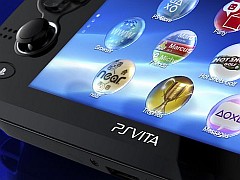
In front of you, with the sleek curves, gentle contours and heavy blacks, the Vita is unmistakeably Sony. It might look at first glance like one of its predecessors, but it doesn’t take long for the eyes to notice the improvements – some dramatic, some that only serve to highlight the quality of the construction: dual analogue sticks that spring back with a subtle but lively bounce, both ringed with a thin edge of silver; coated grips on the reverse to rest your middle fingers; twin cameras and three Apple-esque, metallic effect buttons on the top of the unit for power and volume.
Of course, the Vita hides many such nuances at first, the system’s main features only becoming apparent once the console is powered on. There’s a slightly pregnant pause when you first flick the switch, an invisible boot up process delaying anything for a couple of seconds, but once the Vita is ready to meet you it’s a relatively straightforward introduction. The touch screen works a treat, instantly inviting you to enter the date and your PlayStation Network account, and then presents you with the Vita’s brand new user interface, dubbed LiveArea, for immediate consumption.
The console’s other new features – the rear touchpad, the gyroscopic sensors and the location-based services – hide away in the various pre-installed applications and, of course, any games you might have picked up alongside the machine itself. The most immediate toy – namely the precise (albeit plastic) touch screen – is new to PlayStation but no doubt familiar to almost everyone interested in Vita, and it’s second nature to start tapping, holding and swiping your way around the console’s various windows.
User Interface
/https://oimg.videogamer.com/images/1487/psvita_605.jpg)
No doubt you’ll have already seen the Vita’s interface, the core of which is based around a series of vertical pages that house what are now known as “bubbles”. Each bubble represents an individual application, menu or game, and can – like most other mobile devices – be moved around and positioned anywhere on an unlimited number of pages. The bubbles snap into place at one of ten spots on each page (a trio of rows, consisting of a line of three, then four, then three, populates each page) which means, coupled with the ability to set a different background image per page, users can tailor each section as they wish. You could have one page for games downloaded from the PlayStation Store, for example, and another for the system tools.
The Vita also comes with a selection of background effects for each page. Most of these are based on the familiar XMB ‘waves’ system, but there are a few others, including a plain black background which really helps highlight the bubbles. You can also set a background image for the Vita’s lock screen, which features a simple page peel effect and an optional entry passcode – images can be downloaded from the web, taken with the on-board camera, or transferred from a PS3 or a Windows PC via Sony’s Content Manager tool.
Tapping a bubble opens up a LiveArea page for that particular application. These are laid out to the right of the main pages, and are thus accessed with a horizontal swipe. The Vita can hold six of these, meaning that in theory six applications can be open simultaneously; they’re not quite the same as multitasking, but tapping the PS button (located bottom left of the console, under the first analogue stick) brings up a quick selector that also includes the Home section – from here you can tap and jump to any open LiveArea. It’s worth noting that you can only have one game open at once, regardless of how many of the six slots are empty, and opening a seventh will close the first.
It works well, even if some of the LiveArea screens are a little ugly in design. The smartest aspect of them, though, is that in most cases they do live up to their name. For example, opening Uncharted: Golden Abyss presents the user with a central box to jump straight into the game but also houses a weblink, an option to search for the game online, and a help menu, alongside a ‘refresh’ button that manually updates the LiveArea page. Scrolling down offers up a list of recent activity on the game, including secrets you’ve found and any milestones. More interestingly, it also does the same for your friends, assuming they’ve set their privacy options accordingly.
Other games and applications show different LiveArea options. Everybody’s Golf 6, for example, also presents a link to the PlayStation Store (for any DLC and the Online Pass), an option to jump straight into the game’s shop (with any new Sale items), and also the online mode. Any game software updates also occur here – the update downloads in the background once prompted and only affects your play if and when you choose to perform the actual update, at which point the Vita will close the game, run the patch, and then load the game back up again. Updates are indicated via a neat orange light, and work far more gracefully than we’re used to on the PS3.
Apps
/https://oimg.videogamer.com/images/555a/vitanear605.jpg)
The Vita comes pre-loaded with a generous selection of applications. The first is Welcome Park, which is half-game half-tutorial, and introduces the owner to five different mini-games that all highlight the console’s new features. A tile-sliding game involves the camera; a simple music demo lets you record your own voice; a number tapping game surprises you with some rear touch pad action; a basic skateboard game involves you tilting the device to avoid bouncing balls; and a final game challenges you to find faces in everyday objects, which the Vita then animates to (potentially) humorous results.
Once you’ve bagged the gold Trophy, of course, Welcome Park will be of little value, but it’s a nice idea. Of more tangible benefit are a trio of PSN-based applications: Friends, Party and Group Messaging. The first is unmistakeable, but it’s lovely having mobile access to your main friends list, and being able to see who’s playing what on their PS3 is as useful as it is obvious; you can also add Friends, compare Trophies and check recent activity from here too. There’s not a constant connection to the friends list, though – like most apps on the Vita – so it’ll need to refresh each time it’s opened. It’s a minor inconvenience and one that presumably makes a big difference to the battery life. The Party application lets you invite buddies for online chat in your own bespoke rooms, and Group Messaging does exactly what the name suggests. It’s a shame these are separate apps rather than being built in to the OS, as they are on the PS3, but that’s not a massive deal-breaker.
Near is possibly the smartest new feature. Effectively a way of finding new friends, Near shows any Vita owners in your vicinity, what they’re playing and – crucially – what they think of them. The tool crowdsources opinion, and rewards those that use it regularly with Game Goods; the latter open up new options within titles you already own, like tweaks to the games in Little Deviants to make things easier. Game Goodies are downloaded swiftly and show who offered up the prize. Near is naturally better with the 3G version of the console, but is nice to have even if you’ve only got the Wi-Fi model.
The Vita also features a fully-fledged web browser (disappointingly still based on ACCESS’ NetFront, but much quicker than the one on the PS3), a PlayStation Store application that’s slick and easy to use, and a dedicated Remote Play tool – although this doesn’t expand on the already meagre list of compatible games. There’s also a set of media players – Photos, Music and Videos. Photos gives you access to the Vita’s camera, which isn’t anything particularly fancy, but capable enough in daylight. It’s worth mentioning that a memory card is required for a good chunk of the Vita’s core functionality, and absolutely needed for the majority of games, even if you buy physical cartridge based titles rather than from the PlayStation Store.
After a week of testing
/https://oimg.videogamer.com/images/9c7f/vitaangle605.jpg)
The Vita demands a little time before you adjust to its new interface. It’s about as far from the traditional Sony XMB as it could have been, but ultimately the LiveArea approach is much better suited to something with a touch screen, the experience feeling like a mixture of iOS’s simplicity and Android’s live updates. The actual appearance of the UI is a more subjective matter – some may really love the icons and colours used, but some may well wish for a return to Sony’s stark, minimal approach. An option to customise the themes is surely on the roadmap, regardless.
Crucially, where the Vita really needed to shine – the screen quality and the battery life – it does so in spades. The 5-inch OLED screen, with its 960×544 resolution, is utterly fabulous: dark tones are deep and consistent, with colours popping as brightly as the best TV sets. Although some of the top tier titles don’t run at the native resolution, the ones that do (Virtua Tennis 4 springs to mind) look absolutely amazing, especially at 60fps. Any worries about the Vita’s screen should be put to rest: it’s wonderful.
Battery life, too, impresses, at least compared with the current competition. Side-by-side with the 3DS, the Vita outperforms Nintendo’s console – and whilst it’s definitely not going to last a transatlantic flight, it’s entirely possible to get a good four hours or so hammering games, nipping online and taking a few photos; occasionally you’ll squeeze out a little more, depending on usage. Uncharted seems to be pushing the Vita a little harder than most titles, but expect games that use the camera or the Wi-Fi to drain the battery at a quicker rate than those that don’t.
It’s definitely a lovely machine. The Vita itself is a well-built, solid portable with plenty of grunt under the bonnet, and, on its own, probably priced about right. You’ll want a memory card, of course, and this bumps the cost up another £40 for the 16GB, but if mobile gaming means more to you than Angry Birds and you want the PlayStation experience in the palm of your hands, Vita will no doubt suit you down to the ground. It certainly helps that the UK release – on February 22 – comes with one of the best launch line-ups a console has ever seen, so let’s hope the future release list stays as rosy.
About the Author